








 Full Details







BookTrackr™ is a members only feature that allows you to customize Worlds Without End to reflect your reading history. Want to read all the Hugo or Nebula award winners? How about all the award winning books from 1987? What about the best books by your favorite authors? BookTrackr™ will show you which ones you've already read and which ones you've missed.
Check out the Administrator's List to see BookTrackr™ in action.
Click here to join if you're not already a member. It's quick and easy and it's free! If you're already a member be sure to log in.
How do I use BookTrackr™?
Once you've joined and/or logged in, follow these steps to get tracking!
Step 1 - Find Some Books
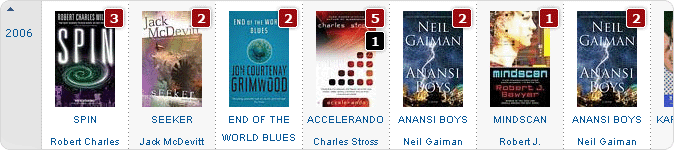
Peruse the WWEnd site and find the books you're interested in. They can be books you've already read or books you want to read. Use the search if you have a title or author in mind or just browse through the awards listings, the book lists or our SF/F/H series pages to find some. You can also look through the author or publisher pages to find books.
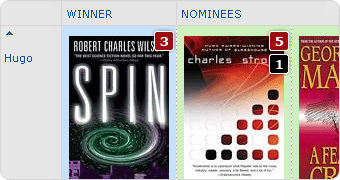
As you look around you'll notice the number boxes on the cover images. Use these numbers to find the most celebrated books in our database. The red number indicates the number of award nominations the book received and the black number tells you how many book lists that book appears on.
Step 2 - Tag the Books You've Found
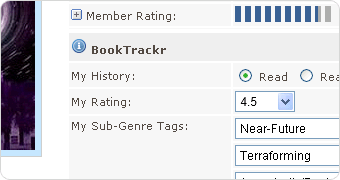
When you locate a book you want to tag, click the title or cover graphic to go to that novel's page. On the novel page you'll find the BookTrackr™ section under the book details. This only displays for members who are currently logged in. Use the BookTrackr™ form to tag the novel in any way you want:
- My History - Mark it as Read, Reading or the default Not Read.
- My Rating - Rate the book from 1-5 stars.
- My Sub-Genre Tags - Select up to 3 different sub-genres that you think accurately represent that book. The top three selections from all users will appear in the information section for that book and form the basis for our sub-genre searching.
- My Book Lists - Add the book to your Reading or Favorites Lists. These lists appear in your My World page.
- My Notes - Use the My Notes section to record info for yourself, that nobody else will see, like who recommended the book to you or even who you've loaned your copy out to!
- My Review - Use this section to submit a review. Share your opinions, good or bad, with the rest of the WWEnd community. You can mark it as private if you're not ready to share your review just yet. Have you got a bunch of reviews in the can on your blog? Leverage those archived blog articles and drive some traffic to your site by posting an extract on WWEnd and linking to the full review on your own site.
When you're finished tagging the book be sure to click the Submit button to save your changes.
Do this for all the books you want to track. It's a bit time consuming up front, especially if you've read a lot of books, but once your initial tagging is complete it's easy to maintain.
Step 3 - View the Results

As you go, you'll notice BookTrackr™ color coding your tagged books. Anywhere that a book appears, on the awards listings, author pages, publisher pages etc., it will be color coded according to the BookTrackr™ Legend in the right column.
The results will show you all kinds of things about your reading history like how many Hugo winners you've read, which of the classics you've missed, which years you were most actively reading and so on.
Your My World page has all your lists for easy reference. Favorite SF books, favortie fantasy books, your reading list and your favorite authors list. There's even a complete list of all the books you've tagged as read and another list of all the authors you've read too. You can share those lists with friends and other WWEnd members too. You don't have to be logged in to see the lists so you can link to them from your own web site.
To check out other people's lists, just click on their member name or avatar in the forum and elsewhere to see their My World page. On the novel page you can see who else tagged the same book and what they rated it in the Member Rating section.
Step 4 - Check Your Stats
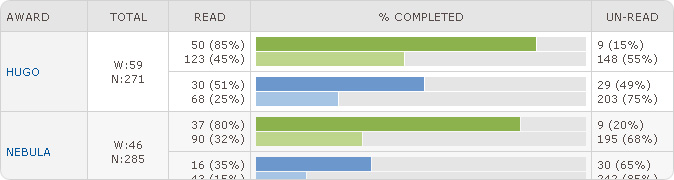
Now that you've tagged all your books take a look at your Reading Stats in My World. Ever wonder how many more books you need to read to finish all the Hugo winners? Trying to read the complete SF Masterworks series? Go to the Reading Stats page in the My World section and see at a glance where you stand with all the awards and book lists. You may be surprised with the results.
And, just for fun, you can compare your stats to any other member's to see how you stack up. Go to their My World page and click the Reading Stats link to see their stats side by side with your own.
You can also track which series you've read from by going to the SF/F/H series page and clicking the My Series link in the alpha menu. It will show you all the series you've started, completed or even tagged to read later which is great for finding the books you've missed while waiting for the author to write the next volume!

